 Sheafwriter
 vs Scrivener
Scrivener and Sheafwriter are both built for writing long books in scenes and chapters. The main differences: Sheafwriter keeps the book in plain Markdown files, adds a plot grid, a story timeline and a shared series bible, and typesets the print-ready PDF and the cover itself. Scrivener is a mature, finished product with an iPhone and iPad app and room for research files inside the project.
How do Sheafwriter and Scrivener compare?
| Sheafwriter | Scrivener | |
|---|---|---|
| Price | Free during the beta. No account, no subscription | $59.99 for macOS or for Windows, $23.99 for iOS, each bought separately. One-time purchase; major upgrades are paid. Free trial: 30 days of actual use |
| Systems | macOS, Windows and Linux (public beta); iPhone, iPad and Android planned | macOS, Windows, iOS (iPhone and iPad) |
| How the book is stored | A folder of plain Markdown files on your computer | A Scrivener project, which is a folder of files and subfolders. Syncing with the iOS app needs a Dropbox account |
| Planning | Cards and outline, plus a plot grid of threads or point-of-view characters across chapters | Corkboard with index cards, and an outliner |
| Story timeline | Chronology view in story-time order; marks flashbacks and point-of-view overlaps | No timeline view among its listed features; Literature & Latte suggests labels and collections for tracking timelines |
| Characters and places | Sheets with aliases, names recognised in the text, “Appears in” lists, and a series bible shared between books | Character Sketch and Setting Sketch document templates |
| Research material | Text notes in the project | Imports PDFs, images, web pages and media files into the project |
| Typeset print-ready PDF with hyphenation and widow control for KDP, IngramSpark and custom sizes; print cover with spine and barcode | Compile to PDF; widow and orphan control when compiling to PDF or printing on macOS | |
| Ebook and other formats | EPUB 3, DOCX, PDF, Markdown | ePub and Kindle ebooks, Word, RTF, OpenOffice, Final Draft, PDF |
| AI | None | None — Literature & Latte states that Scrivener does not use AI in any way |
Can I move a Scrivener project to Sheafwriter?
Yes. File ▸ Import from Scrivener… reads a .scriv project with its notes, characters, places and snapshots. Your Scrivener project is not changed, so you can try Sheafwriter on a real book and go back if it does not suit you. Scrivener notes can be moved into the story bible afterwards with right-click ▸ Move to Bible.
If you miss Scrivener’s Scrivenings mode, open a chapter as Text: all its scenes one under another, editable in place.
What does Sheafwriter add for plotting?
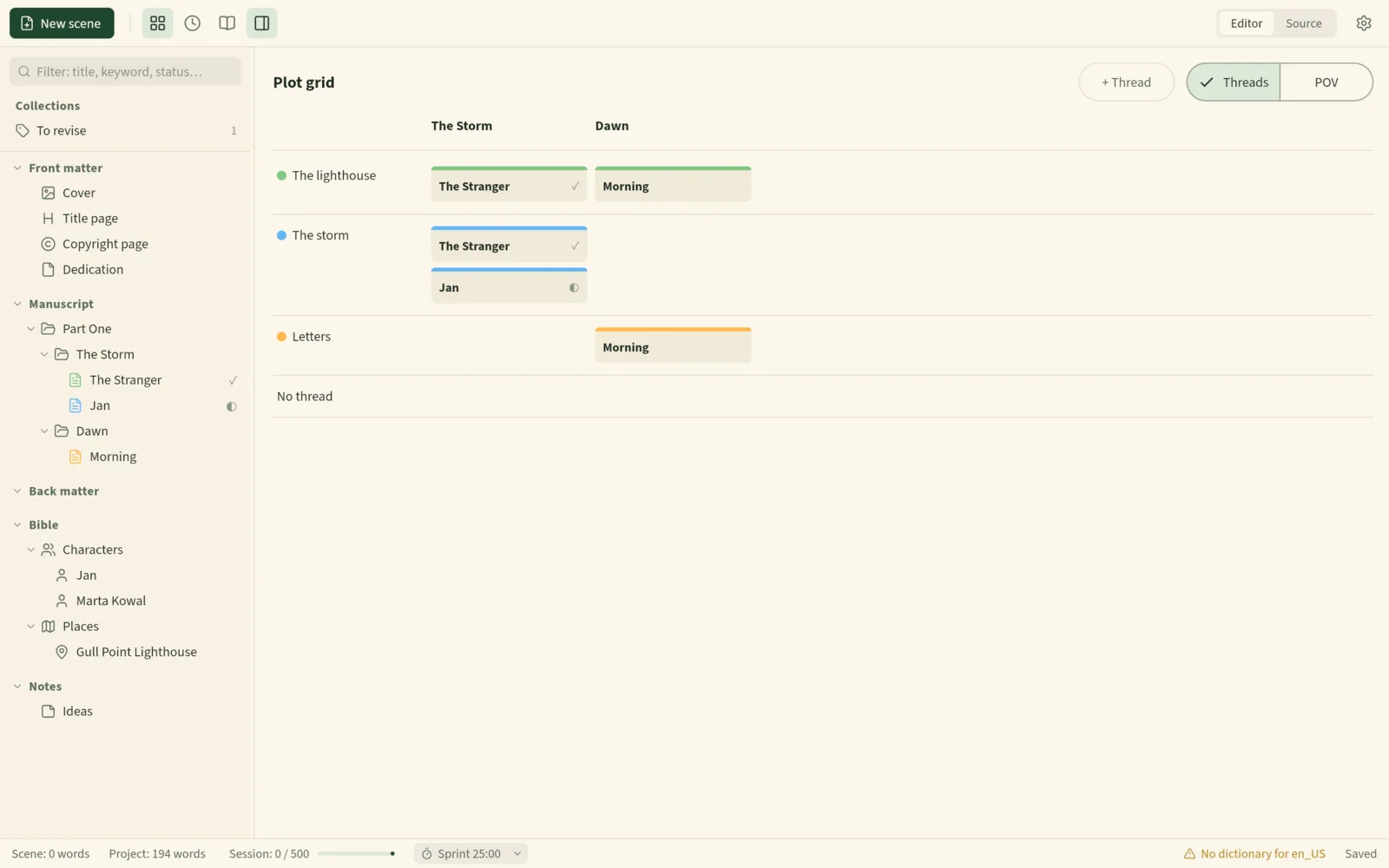
Scrivener plans with a corkboard and an outliner, and Sheafwriter has cards and an outline too. On top of that it has a plot grid and a chronology: plot threads or point-of-view characters against chapters, and every scene in story-time order with flashbacks marked. Each scene can also record its goal, conflict and outcome.
How do they differ on the way to print?
Both can produce a PDF and an ebook. Sheafwriter is built to finish the job: three book styles, print targets for KDP, IngramSpark and custom trim sizes, hyphenation by the book’s language, a preflight check before saving, and a print cover with the spine width worked out from the page count and a barcode from the ISBN. Scrivener’s Compile is more flexible about formats — it also writes RTF, OpenOffice and Final Draft, which Sheafwriter does not.
When is Scrivener the better choice?
- You write on an iPhone or iPad. Scrivener has an iOS app today; Sheafwriter’s mobile apps are only planned.
- You are on Windows and want a finished product now. Sheafwriter’s Windows build is still in testing.
- You keep research inside the project — PDFs, images, web pages, audio. Sheafwriter’s notes are text.
- You write screenplays or academic work and need Final Draft, RTF or Pandoc/MultiMarkdown output.
- You want software that is out of beta, with years of documentation and a large community.
When is Sheafwriter the better choice?
- You want one desktop app from the first scene to a print-ready PDF and an EPUB.
- You want your book in plain Markdown files you own, readable in any text editor and synced with whatever you already use.
- You plan with plot threads, a story timeline and a story bible, including one bible shared by a whole series.
- You want no account, no subscription and no AI, and an app that never connects to the internet.
Sheafwriter is in beta, so expect rough edges. The Windows and Linux builds are newer and less tested than the Mac one, and there is no mobile app yet. It has three book styles for print, fewer than dedicated formatting apps, no real-time co-writing and no built-in cloud.
Frequently asked questions
Can Sheafwriter open Scrivener files?
Yes. It imports a .scriv project with its notes, characters, places and snapshots. The original Scrivener project is left unchanged.
Is Sheafwriter free?
Sheafwriter is free during the beta, with no account and no subscription. Scrivener is a one-time purchase per platform.
Does Sheafwriter have a corkboard like Scrivener?
Yes. A chapter opens as cards, as an outline, or as one continuous text. Sheafwriter also has a plot grid and a chronology view.
Does Sheafwriter run on iPad?
Not yet. iPhone, iPad and Android apps are planned. Scrivener has an iOS app today.
Try the free public beta In beta testing · macOS, Windows, Linux