 Sheafwriter
A story bible for your novel, and one for the whole series
Sheafwriter keeps a sheet for every character and place, recognises their names in your text, and shows which scenes each one appears in. For a series, one shared bible of characters and places serves every book, so a detail fixed in book one stays fixed in book four.
What is a story bible?
A story bible is the reference file of a novel: who the people are, what the places look like, and the facts you must not contradict two hundred pages later. In Sheafwriter it lives in the binder under Bible, in two sections — Characters and Places — next to the manuscript it describes.
How do character and place sheets work?
- Create a sheet by right-clicking Characters or Places. New sheets start from a template you can edit.
- Add aliases — other forms of the name, such as a surname, a title or a nickname. Inflected forms are recognised (English
’s, German-s, Polish endings); irregular forms you add yourself. - Add a role and an image in the sheet’s Inspector.
- Read a sheet while you write: right-click it and choose Open Beside to keep it next to the editor.
How does Sheafwriter know where a character appears?
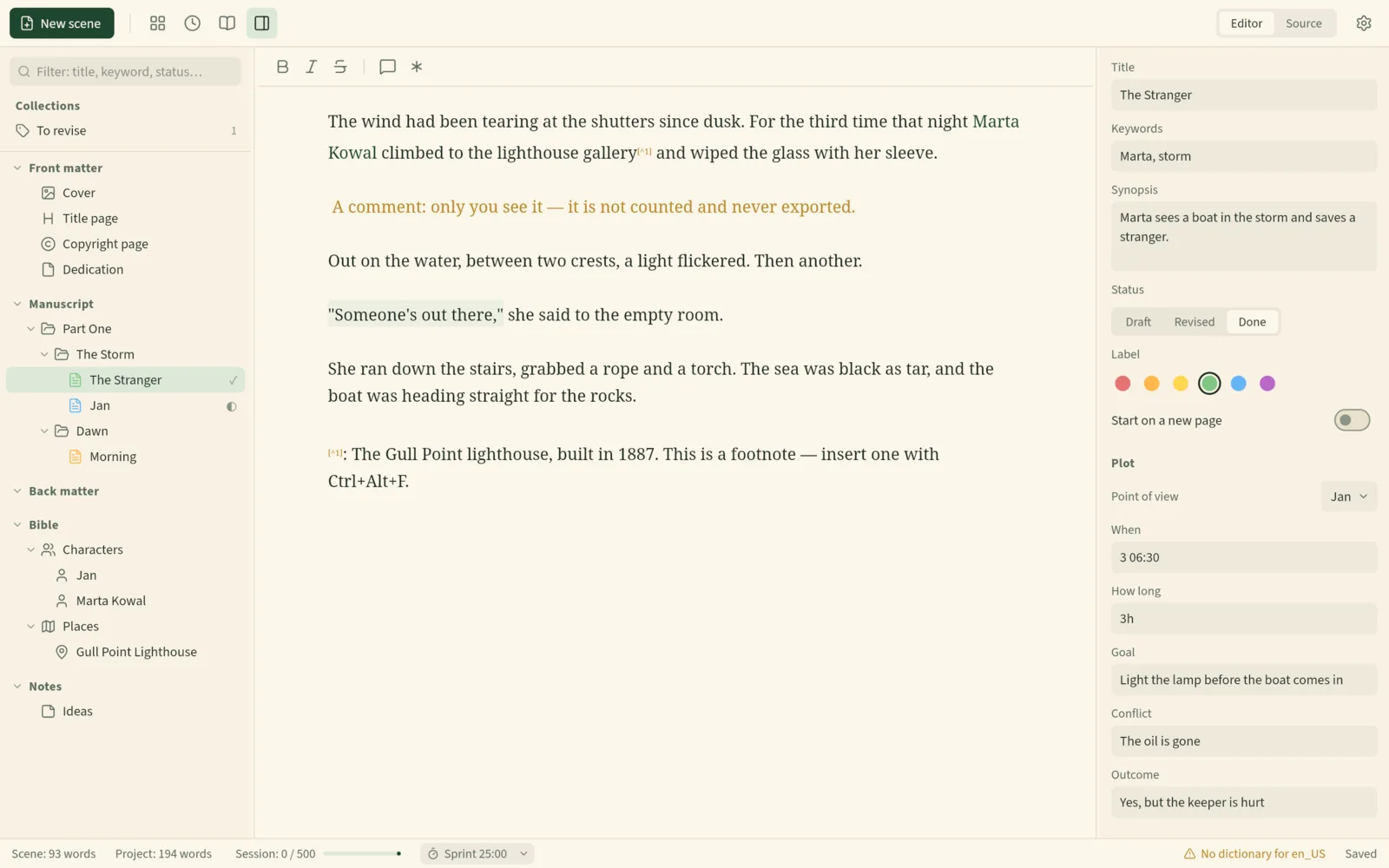
Names from the Bible are coloured in the scene text as you write. The scene’s Inspector shows who is mentioned and who you have pinned to the scene. On each character’s sheet, Appears in lists the scenes where that character is pinned or mentioned — a quick way to check a minor character’s whole arc before you revise it.
The same names feed the rest of the app: after three capitalised letters, name completion offers the rest of a name, and Bible names are never flagged by the spell-checker.
How do I keep characters consistent across a series?
With a series bible: a folder of characters and places shared by every book of the series.
- Open File ▸ Series… and choose Create new…, giving the series a title and a folder.
- In each other book, choose Join existing… and pick that folder.
- The series appears in the binder under the Bible. Its sheets work like the book’s own: names coloured in the text, point of view, “In this scene” and “Appears in”.
- To promote a character to the series, right-click the sheet and choose Move to Series. Scenes keep pointing at it.
Series words do not count toward the book’s word count, and backups include the series. If the series folder cannot be found — another computer, an unplugged disk — the status bar says so and nothing else changes.
Can I bring a story bible from Scrivener?
Yes. Importing a .scriv project brings its notes, characters and places. Notes that ended up elsewhere can be moved into the Bible with right-click ▸ Move to Bible.
Where are the sheets stored?
As plain Markdown files in the project’s bible/characters/ and bible/places/ folders, readable in any text editor. A series bible is simply another folder, which you can sync like the rest of your work.
Full details are in the manual chapter Characters and places (Bible).
Frequently asked questions
Can several books share the same characters?
Yes. A series bible is a shared folder of characters and places that every book of the series can join.
Does Sheafwriter recognise nicknames and other forms of a name?
Yes. Each sheet has aliases, and inflected forms such as the English possessive are recognised. Irregular forms can be added by hand.
Can I see every scene a character appears in?
Yes. The Appears in list on a character’s sheet shows the scenes where the character is pinned or mentioned.
Is the story bible stored online?
No. Sheets are plain Markdown files in your project folder. Sheafwriter has no account and does not connect to the internet.
Try the free public beta In beta testing · macOS, Windows, Linux