 Sheafwriter
A plot grid and a story timeline built into your manuscript
Sheafwriter shows your novel two ways besides the text: a plot grid with chapters as columns and plot threads (or point-of-view characters) as rows, and a chronology that lists every scene in story-time order, marking flashbacks and characters who appear in two scenes at once.
What is a plot grid?
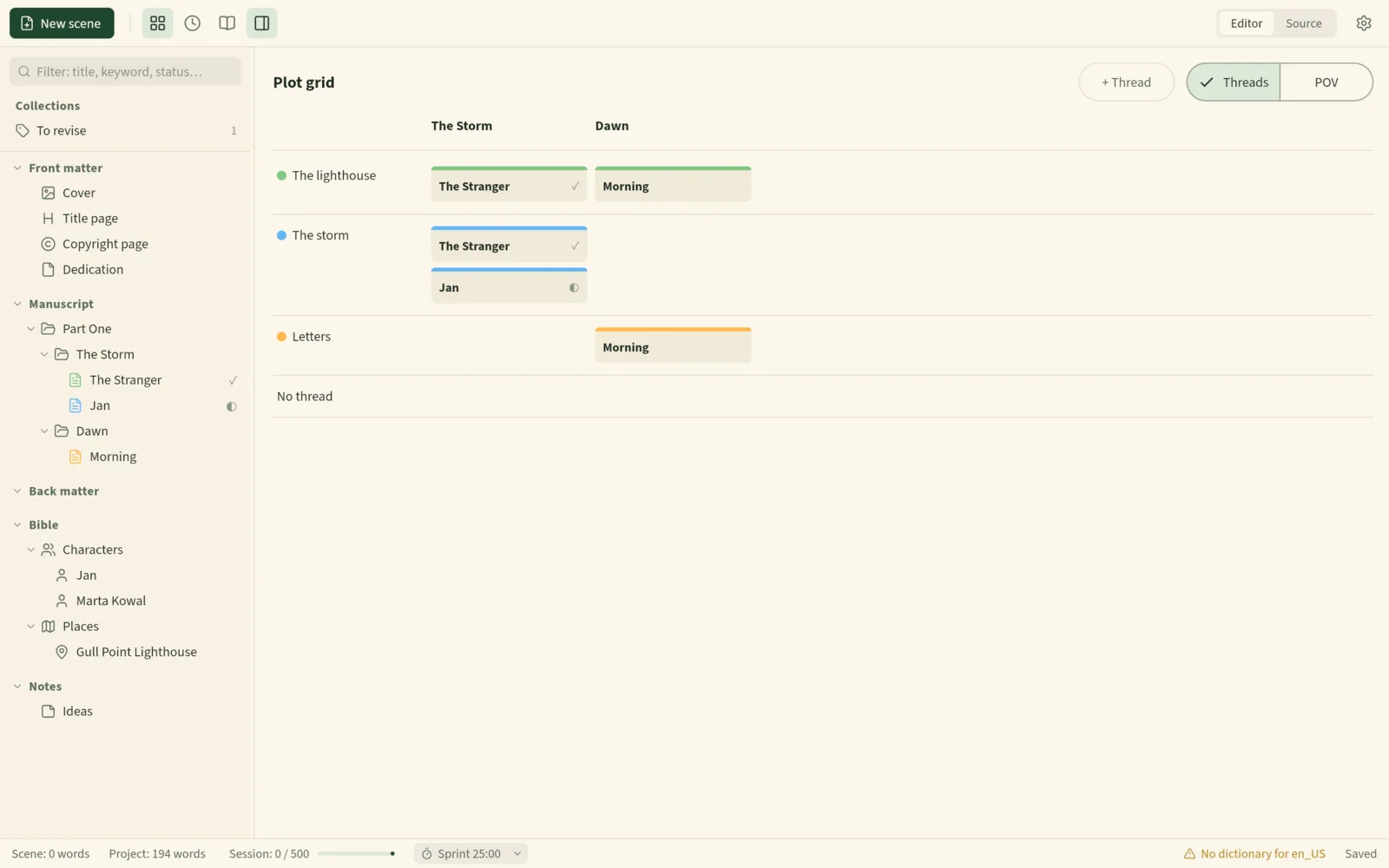
A plot grid is a table of the whole book. In Sheafwriter the columns are your chapters, in reading order, and the rows are your plot threads — the main plot, a romance, a mystery, a character’s arc. Every scene is a card in its chapter’s column, in the row of each thread it belongs to. At a glance you can see a subplot that disappears for eight chapters, or a chapter where nothing moves the main plot forward.
Flip the POV switch and the rows become your point-of-view characters instead, so you can see how the narration is shared out.
How do I use the plot grid?
- Open it with View ▸ Plot grid (
Ctrl+Alt+G). - Add a thread with + Thread. Right-click a thread’s name to rename it, change its colour, move it up or down, or delete it — the scenes themselves are not touched.
- Right-click a card to tick the threads its scene belongs to. You can also set them in the scene’s Inspector.
- Click a card to open the scene, or right-click to open it beside the editor.
Scenes without a thread, or without a point of view, collect in the last row, so nothing is hidden.
How does the chronology work?
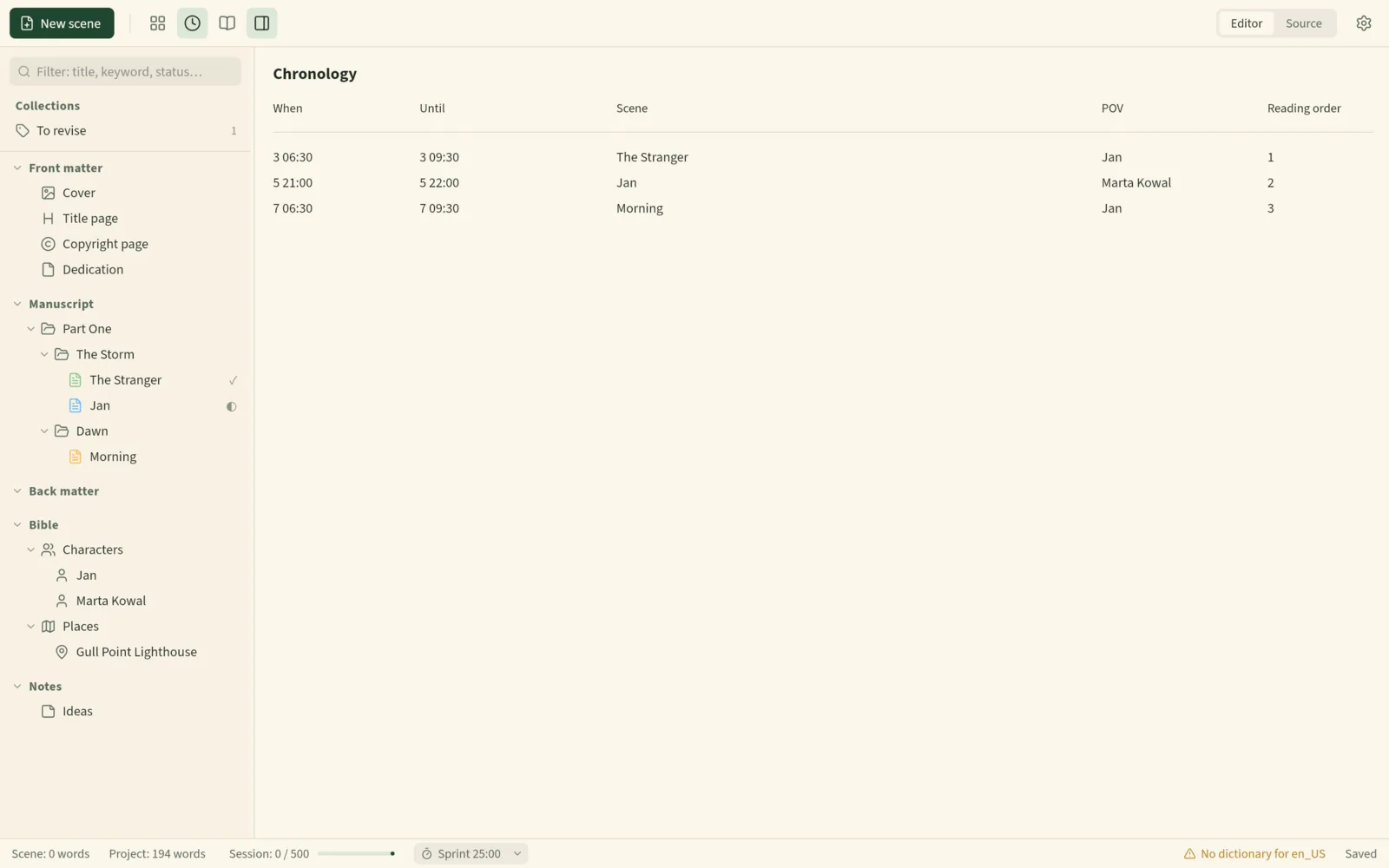
Each scene can carry a place in story time. In the Inspector you set When and How long. Time can be a calendar date — 2026-03-14 or 2026-03-14 08:30, in any year — or a story day such as 12, or -3 for three days before the story starts. Durations are written like 45m, 2h, 3d or 1w.
View ▸ Chronology (Ctrl+Alt+H) then lists the manuscript’s scenes in story-time order, with when each starts and ends, its point of view and its place in reading order.
How does Sheafwriter find timeline mistakes?
- ↺ marks a flashback — a scene earlier in story time than the scene read just before it. Intended flashbacks are confirmed; accidental ones stand out.
- ⚠ marks a point-of-view character who is in two scenes at once. Only scenes with both a time and a duration are checked.
- Scenes without a time are listed at the end, so you can see what is still undated.
What else can a scene record for plotting?
Besides point of view, time and threads, each manuscript scene has fields for its Goal, Conflict and Outcome. Empty fields are not saved, so you can use as much or as little structure as you like. For a closer view of one chapter, open it as cards or as an outline with synopsis, status and word counts.
Where is the plot data stored?
In your project folder, in plain text. The list of threads is in .novel/threads.json, and each scene keeps its own threads, point of view and times in the front matter at the top of its Markdown file. Nothing is locked in a database.
Full details are in the manual chapters Plot grid and chronology and Inspector.
Frequently asked questions
Can I plot by point-of-view character instead of plot thread?
Yes. The POV switch on the plot grid turns the rows into your point-of-view characters.
Do I have to use real dates for the timeline?
No. You can write time as a calendar date in any year, or as a story day such as 12, or -3 for three days before the story starts.
Does the chronology detect flashbacks?
Yes. A scene earlier in story time than the scene read just before it is marked as a flashback.
Is the plot grid a separate app from the manuscript?
No. The plot grid and the chronology are views of the same project you write in. Clicking a card opens the scene.
Try the free public beta In beta testing · macOS, Windows, Linux